Net worth dashboard CSV description
All of the data displayed on the dashboard is sourced from a single CSV file:
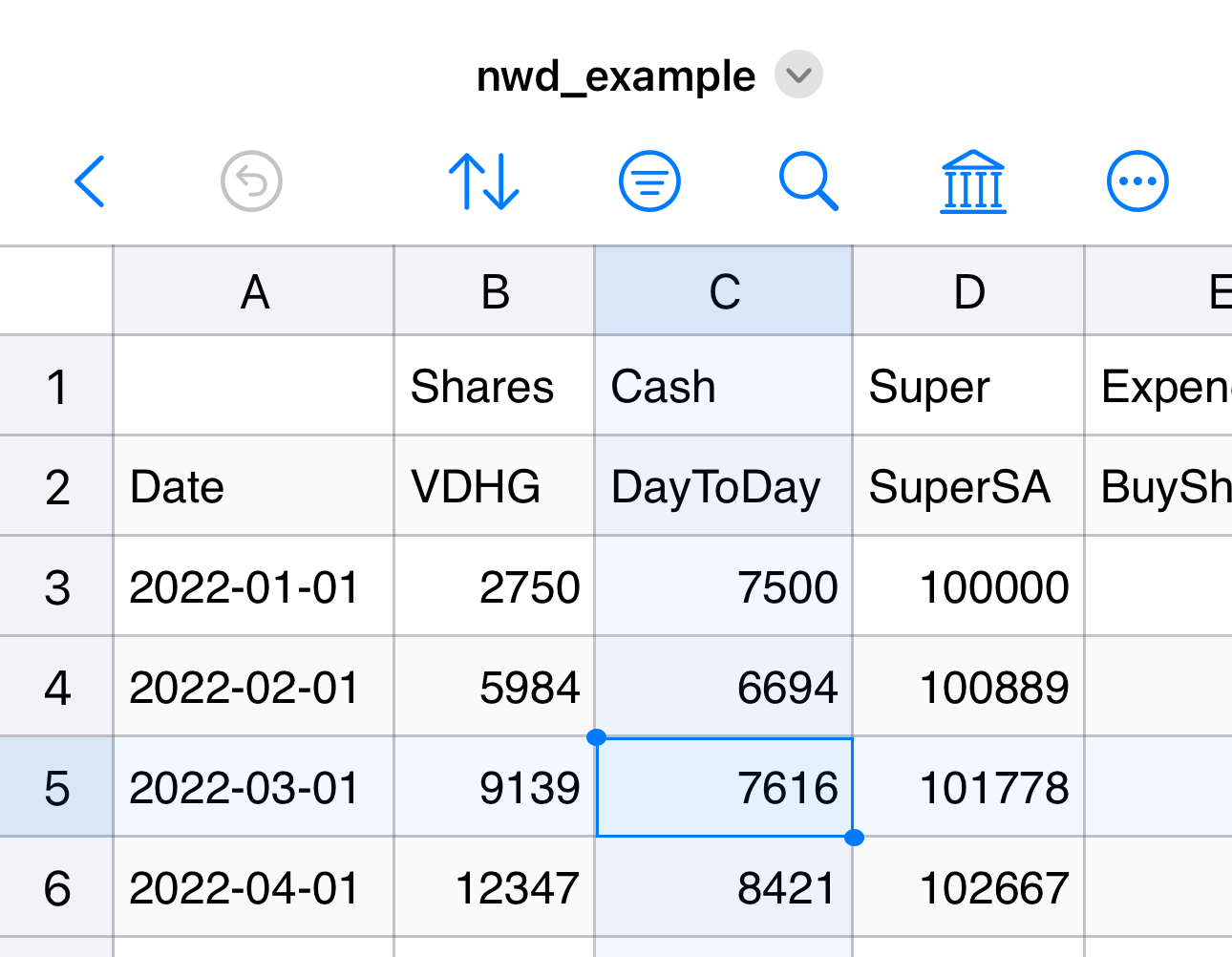
There are several features to this CSV file.
Standard headers
There are two rows of headers in this CSV file. The first row is the category of each column:
Cash- Liquid assets, possibly including day-to-day accounts as well as high-interest or term deposits
Super- Current value of retirement fund(s)
Shares- Current value of investments in shares/stocks/ETFs/etc.
Expend- Once off expenditure of share investments. This allows the tracking your total profit/loss of your share portfolio
Income- Once off income (pay/rent earned/interest/dividends)
As these are controlled labels, they must match exactly the strings above or the column will be ignored (which can be useful to add extra "comment" columns if desired). These labels are called the "column category".
The second row is the "column name". One of the columns must have column name of Date with entries by default in format YYYY/MM/DD (this date format is intepreted by Python's datetime module and can be customised as desired using parameter datefmt — strongly recommend a format which can be automatically sorted in your CSV editor).
All other column names are free text so you can label the columns to match your circumstances (e.g., the name of the bank or super account). You can have as many or as few columns in each category as you like; they will be aggregated automatically to form the totals displayed in the dashboard.
Structure of entries
Not all entries are expected to be filled in for every row. Cash, Super, and Shares — all the columns capturing the "current value" of your investments — must be entered collectively on a single date so that snapshot totals can be calculated. Typically you would enter these only after an income event — e.g., fortnightly or monthly.
Because certain calculations are performed based on the first and last total entry in a year, it is a good idea to also add an entry for Jan 1 and Dec 31 even if they fall outside your standard cycle.
Expend and Income entries can be entered individually as they happen.
Currency format
At time of writing, all amounts entered into the CSV file must be in integer dollar amounts.
Renaming column categories
Renaming the column categories can be performed using code such as:
import networthdash as nwd

nwd_str = nwd.Strings(
    sharescol = “Stocks”,
    supercol = “401k”,
)

nwd.dashboard( …, strings = nwd_str )